ノボジーン
  • ノボジーン
  • ゲノミクス
    • ヒト全ゲノムシーケンス
    • 動植物全ゲノムシーケンス
    • 微生物全ゲノムシーケンス
    • 動植物de novoシーケンス
    • 微生物de novoシーケンス
    • ショットガンメタゲノムシーケンス
    • アンプリコンシーケンス
    • 全エクソームシーケンス
    トランスクリプトミクス
    • mRNAシーケンス
    • トータルRNAシーケンス
    • 全長トランスクリプトームシーケンス
    • 全トランスクリプトームシーケンス
    • スモールRNAシーケンシング
    • 環状RNAシーケンス
    • メタトランスクリプトームシーケンス
    • 原核生物RNAシーケンス
    シングルセルと空間オミクス
    • シングルセル遺伝子発現解析
    • シングルセル免疫プロファイリングシーケンス
    • シングルセルロングリードトランスクリプトーム
    エピゲノミクス
    • 全ゲノムバイサルファイトシーケンス(WGBS)
    • ディレクトDNAメチレーションシーケンス(DM-Seq)new
    • 還元型バイサルファイトシーケンス (RRBS)
    • クロマチン免疫沈降シーケンス(ChIP-Seq)
    • RNA免疫沈降シーケンス (RIP-Seq)

    相乗りシーケンス

    • 相乗りシーケンス(イルミナプラットフォーム)
    • 相乗りシーケンス(PacBioプラットフォーム)
    プロテオミクス & メタボロミクス
    • Olinkプロテオミクス
  • プロモーションプロモーション
    • プラットフォーム
    • インテリジェント自動化プラットフォーム(Falcon)
    • バイオインフォマティクス解析ツール(NovoMagic)
    • カスタマサービスシステム(CSS)
    • パンフレット
    • ケーススタディ
    • ウェビナー
    • ブログ
    • サンプルガイドライン
    • コンミュニティ
    • がん研究
    • がん免疫
    • アグリゲノミクス
    • 環境
    • 食品科学
    • ヒトマイクロバイオーム
    • 植物および動物マイクロバイオーム
    • 創薬および開発
    • 希少および複雑性疾患
    • ノボジーンについて
    • 拠点一覧
    • ニュース
    • キャリア
  • お問い合わせお問い合わせ
  1. Home
  2. Resources
  3. ブログ
  4. Four Powered Online Tools for Genomic Analysis and Visualization (III) – iTOL

Four Powered Online Tools for Genomic Analysis and Visualization (III) – iTOL

III. iTOL – Evolutionary Tree Beautification

In biology and related fields of science, phylogenetic trees are vital tools for contextualization and representation of various data types. iTOL (abbr: interaction Tree Of Life) is an interactive tool that integrates online display, annotation and management of evolutionary trees. iTOL is an online tool that can be accessed with any modern web browser, and it is implemented in pure Javascript. This tool enables users to beautify the phylogenetic tree they aim to construct. As they draw, they can freely adjust the color, shape and font of the branches and labels. iTOL can display different datasets simultaneously and offer customized control of position, size and color according to individual needs. The output can finally be exported as high-quality bitmaps and vector graphics.

iTOL supports different common formats of phylogenetic trees: Newick, Nexus and phyloXML. Phylogenetic placement files and annotation files alike can be uploaded directly and annotated for taxonomic, frequency and sequence alignment visualizations. Any extra data that is relevant can be provided in plain text files, and by simple drag-and-drop mechanism, visualized in the user’s web browser. On top of standard display formats (rectangular, circular and unrooted) the latest version of iTOL supports slanted phylogram display mode as well. The trees such built may be manipulated in several ways, and it is possible to interactively edit by deleting or moving single nodes or whole clades. The clades can be pruned, collapsed and various parameters like branch length distance be adjusted either manually or automatically. Since raw FASTA multiple sequence alignments are also supported by the tool, consensus sequences and residue conservation graphs also can be easily calculated and presented.

Hence, allowing for visualization trees with even more than 50,00 leaves, iTOL is a powerful tool at a biologist’s disposal for beautifying the vast genomic data[1]. Get access to use at: http://itol.embl.de/index.shtml.

Step 1. Raw File Preparation Files formats with plain texts only, such as Newick, Nexus, PhyloXML, Text, and Jplace, can be recognized by the tool.

Step 2. Annotation Dataset Download the annotation templates of evolutionary tree from http://itol.embl.de/help.cgi#annot and prepare datasets accordingly.

Step 3. File Upload Upload the original phylogenetic tree file to the “Tree file”.
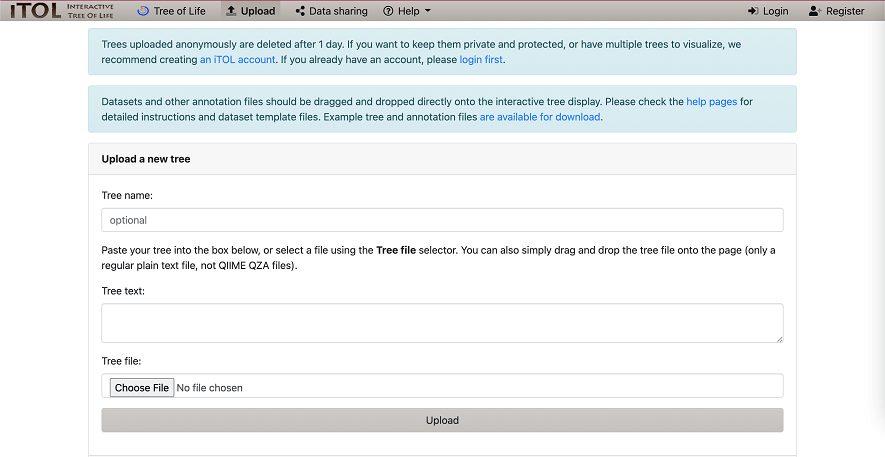
Figure 1. File Upload to the iTOL

Step 4. Evolutionary diagrams Generation Users can adjust the parameters based on specific needs, such as display mode, label font, color, line thickness, etc.

Finally, results can be generated like demos!
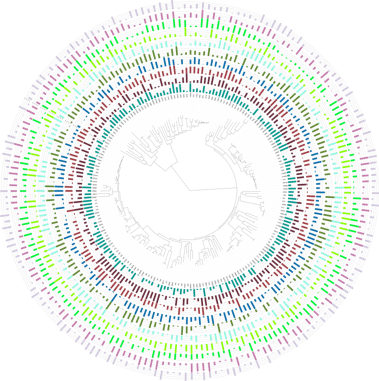
Figure 2. Bar charts datasets
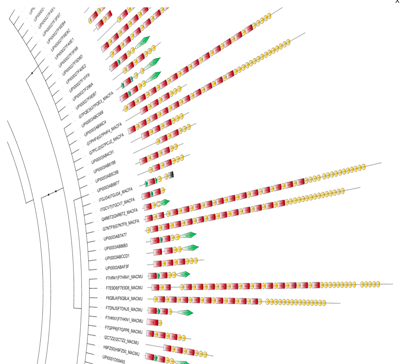
Figure 3. Protein domain architecture datasets
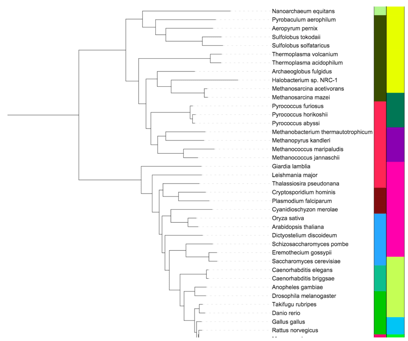
Figure 4. Color strip datasets
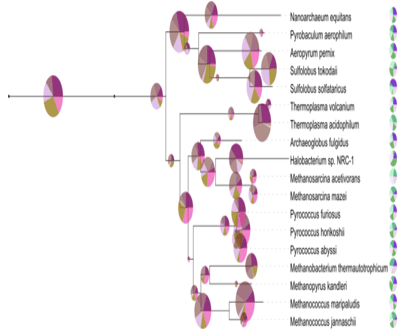
Figure 5. Pie chart datasets.

Reference [1] Letunic, I., & Bork, P. (2019). Interactive Tree Of Life (iTOL) v4: recent updates and new developments. Nucleic acids research, 47(W1), W256–W259. https://doi.org/10.1093/nar/gkz239

サービスサービス menu

サポートサポート menu

会社会社 menu

サービス
全ゲノムシーケンスde novoシーケンスアンプリコンシーケンスショットガンメタゲノムシーケンスディレクトDNAメチレーションシーケンス(DM-Seq)mRNAシーケンスシングルセル遺伝子発現解析Olinkプロテオミクス
サポート
バイオインフォマティクス解析ツール(NovoMagic)カスタマサービスシステム(CSS)インテリジェント自動化プラットフォーム(Falcon)
会社
ノボジーンについて拠点一覧プラットフォームニュースキャリアお問い合わせ
YouTubeYouTube hoverXX hover
Copyright © 2026 Novogene Inc. All rights reserved. 本サービスは研究目的のみにご利用ください。臨床診断目的には使用頂けません。
ノボジーン
  • ノボジーン
  • ゲノミクス
    • ヒト全ゲノムシーケンス
    • 動植物全ゲノムシーケンス
    • 微生物全ゲノムシーケンス
    • 動植物de novoシーケンス
    • 微生物de novoシーケンス
    • ショットガンメタゲノムシーケンス
    • アンプリコンシーケンス
    • 全エクソームシーケンス
    トランスクリプトミクス
    • mRNAシーケンス
    • トータルRNAシーケンス
    • 全長トランスクリプトームシーケンス
    • 全トランスクリプトームシーケンス
    • スモールRNAシーケンシング
    • 環状RNAシーケンス
    • メタトランスクリプトームシーケンス
    • 原核生物RNAシーケンス
    シングルセルと空間オミクス
    • シングルセル遺伝子発現解析
    • シングルセル免疫プロファイリングシーケンス
    • シングルセルロングリードトランスクリプトーム
    エピゲノミクス
    • 全ゲノムバイサルファイトシーケンス(WGBS)
    • ディレクトDNAメチレーションシーケンス(DM-Seq)new
    • 還元型バイサルファイトシーケンス (RRBS)
    • クロマチン免疫沈降シーケンス(ChIP-Seq)
    • RNA免疫沈降シーケンス (RIP-Seq)

    相乗りシーケンス

    • 相乗りシーケンス(イルミナプラットフォーム)
    • 相乗りシーケンス(PacBioプラットフォーム)
    プロテオミクス & メタボロミクス
    • Olinkプロテオミクス
  • プロモーションプロモーション
    • プラットフォーム
    • インテリジェント自動化プラットフォーム(Falcon)
    • バイオインフォマティクス解析ツール(NovoMagic)
    • カスタマサービスシステム(CSS)
    • パンフレット
    • ケーススタディ
    • ウェビナー
    • ブログ
    • サンプルガイドライン
    • コンミュニティ
    • がん研究
    • がん免疫
    • アグリゲノミクス
    • 環境
    • 食品科学
    • ヒトマイクロバイオーム
    • 植物および動物マイクロバイオーム
    • 創薬および開発
    • 希少および複雑性疾患
    • ノボジーンについて
    • 拠点一覧
    • ニュース
    • キャリア
  • お問い合わせお問い合わせ
  1. Home
  2. Resources
  3. ブログ
  4. Four Powered Online Tools for Genomic Analysis and Visualization (III) – iTOL

Four Powered Online Tools for Genomic Analysis and Visualization (III) – iTOL

III. iTOL – Evolutionary Tree Beautification

In biology and related fields of science, phylogenetic trees are vital tools for contextualization and representation of various data types. iTOL (abbr: interaction Tree Of Life) is an interactive tool that integrates online display, annotation and management of evolutionary trees. iTOL is an online tool that can be accessed with any modern web browser, and it is implemented in pure Javascript. This tool enables users to beautify the phylogenetic tree they aim to construct. As they draw, they can freely adjust the color, shape and font of the branches and labels. iTOL can display different datasets simultaneously and offer customized control of position, size and color according to individual needs. The output can finally be exported as high-quality bitmaps and vector graphics.

iTOL supports different common formats of phylogenetic trees: Newick, Nexus and phyloXML. Phylogenetic placement files and annotation files alike can be uploaded directly and annotated for taxonomic, frequency and sequence alignment visualizations. Any extra data that is relevant can be provided in plain text files, and by simple drag-and-drop mechanism, visualized in the user’s web browser. On top of standard display formats (rectangular, circular and unrooted) the latest version of iTOL supports slanted phylogram display mode as well. The trees such built may be manipulated in several ways, and it is possible to interactively edit by deleting or moving single nodes or whole clades. The clades can be pruned, collapsed and various parameters like branch length distance be adjusted either manually or automatically. Since raw FASTA multiple sequence alignments are also supported by the tool, consensus sequences and residue conservation graphs also can be easily calculated and presented.

Hence, allowing for visualization trees with even more than 50,00 leaves, iTOL is a powerful tool at a biologist’s disposal for beautifying the vast genomic data[1]. Get access to use at: http://itol.embl.de/index.shtml.

Step 1. Raw File Preparation Files formats with plain texts only, such as Newick, Nexus, PhyloXML, Text, and Jplace, can be recognized by the tool.

Step 2. Annotation Dataset Download the annotation templates of evolutionary tree from http://itol.embl.de/help.cgi#annot and prepare datasets accordingly.

Step 3. File Upload Upload the original phylogenetic tree file to the “Tree file”.

Figure 1. File Upload to the iTOL

Step 4. Evolutionary diagrams Generation Users can adjust the parameters based on specific needs, such as display mode, label font, color, line thickness, etc.

Finally, results can be generated like demos!

Figure 2. Bar charts datasets
Figure 3. Protein domain architecture datasets
Figure 4. Color strip datasets
Figure 5. Pie chart datasets.

Reference [1] Letunic, I., & Bork, P. (2019). Interactive Tree Of Life (iTOL) v4: recent updates and new developments. Nucleic acids research, 47(W1), W256–W259. https://doi.org/10.1093/nar/gkz239

サービスサービス menu

サポートサポート menu

会社会社 menu

サービス
全ゲノムシーケンスde novoシーケンスアンプリコンシーケンスショットガンメタゲノムシーケンスディレクトDNAメチレーションシーケンス(DM-Seq)mRNAシーケンスシングルセル遺伝子発現解析Olinkプロテオミクス
サポート
バイオインフォマティクス解析ツール(NovoMagic)カスタマサービスシステム(CSS)インテリジェント自動化プラットフォーム(Falcon)
会社
ノボジーンについて拠点一覧プラットフォームニュースキャリアお問い合わせ
YouTubeYouTube hoverXX hover
Copyright © 2026 Novogene Inc. All rights reserved. 本サービスは研究目的のみにご利用ください。臨床診断目的には使用頂けません。
プライバシーポリシーCookieポリシーキャリア